
No products in the cart.
Roll over image to zoom in
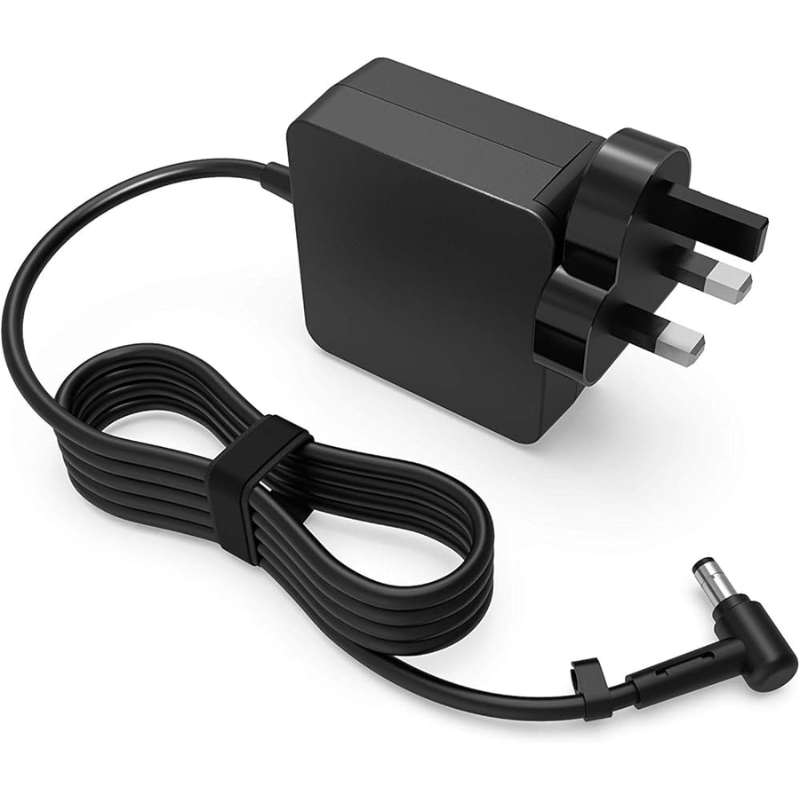
Power Adapter Charger for Asus Q500A
KSh 3,109.00
Technical Specifications
| Metric | Verified Hardware Target |
| Exact Model Support | Asus Q500A / Q500A-BHI5N01 / Q500A-BSI5N04 |
| Physical Connector Profile | 5.5mm × 2.5mm Large Straight Circular Plug |
| Output Voltage Standard | 19 Volts (DC) |
| Amperage Handling Threshold | 3.42 Amperes (65W Baseline) or 4.74 Amperes (90W Upgrade) |
| Total Wattage Rating | 65 Watts to 90 Watts Max (The 90 Watt variant is the factory specification for quad-core configurations and serves as an excellent upgrade for dual-core setups because it operates with a wider power overhead) |
| Input Grid Compatibility | AC 100V – 240V, 50Hz – 60Hz Universal Range |
| Form Factor Configuration | Inline external desktop transformer brick layout accompanied by a detachable 3-prong AC power cord |
Power Adapter Charger for Asus Q500A
The Asus Q500A (including widely distributed retail configurations like the Q500A-BHI5N01 and Q500A-BSI5N04) is a robust 15.6-inch mainstream laptop powered by standard voltage 3rd Generation Intel Core i5 or i7 processors. Unlike modern ultra-low-voltage machines, this series relies on higher performance mobile processors that draw a steady, robust electrical current. To prevent unpredictable motherboard behavior, sudden system freezing under heavy processing loads, or internal battery tracking errors, delivering a flat, entirely ripple-free direct current (DC) line is vital for absolute system stability.
Using cheap, low-tier aftermarket power bricks with poor line regulation exposes your business hardware to severe risks. Inadequate filtration components frequently cause high-frequency ripple current, which manifests as an erratic or jumpy trackpad cursor, delayed battery charging cycles, or long-term component degradation along the motherboard’s internal voltage rails.
Asus Q500A Product Overview
This precise replacement power supply is manufactured to match the high-amperage thresholds and physical socket geometry of the Asus Q500A chassis. Bypassing the miniaturized slim pins found on low-voltage ultrabooks, the Asus Q500A motherboard architecture relies strictly on the classic, heavy-duty 5.5mm outside diameter by 2.5mm inside diameter (5.5mm × 2.5mm) straight circular barrel connector. This broad barrel format seats deeply and securely into the laptop’s side DC-in jack, delivering great mechanical resilience against daily cable tugs and preventing loose connections that generate localized heat. Internally, high-gauge copper wiring ensures minimal energy conversion waste.
Asus Q500A Key Features
-
Thick 5.5mm × 2.5mm Barrel Profile: Form-fitted to seat firmly inside the wide Q500A charging port, completely preventing localized sparking and accidental disconnects.
-
Continuous 19V DC Output: Delivers a stable and clean 19V rail, allowing the Intel Core processor to scale up to maximum frequency during heavy multitasking without system throttling.
-
Integrated Safety Shielding: Equipped with active multi-layer circuits guarding against over-voltage (OVP), over-current (OCP), and short-circuit (SCP) spikes caused by unstable power lines.
-
Universal AC Input Support: Responsively handles alternating incoming current ranges from 100V up to 240V for global compatibility.
Asus Q500A Technical Specifications
| Metric | Verified Hardware Target |
| Exact Model Support | Asus Q500A / Q500A-BHI5N01 / Q500A-BSI5N04 |
| Physical Connector Profile | 5.5mm × 2.5mm Large Straight Circular Plug |
| Output Voltage Standard | 19 Volts (DC) |
| Amperage Handling Threshold | 3.42 Amperes (65W Baseline) or 4.74 Amperes (90W Upgrade) |
| Total Wattage Rating | 65 Watts to 90 Watts Max (The 90 Watt variant is the factory specification for quad-core configurations and serves as an excellent upgrade for dual-core setups because it operates with a wider power overhead) |
| Input Grid Compatibility | AC 100V – 240V, 50Hz – 60Hz Universal Range |
| Form Factor Configuration | Inline external desktop transformer brick layout accompanied by a detachable 3-prong AC power cord |
Asus Q500A Price Breakdown
Selecting a properly insulated and regulated power brick shields your laptop’s internal logic tracks from high-frequency line noise while extending the lifetime of your internal battery cells:
| Power Supply Configuration | Estimated Retail Price Range (KES) | Recommended Application |
| Standard 65W AC Adapter | KES 2,500 – KES 3,500 | The factory configuration baseline. Supplies complete, clean electrical requirements for everyday business productivity, spreadsheet management, office work, and video streaming. |
| Heavy-Duty 90W AC Upgrade | KES 3,500 – KES 4,500 | The recommended performance choice. Because the Q500A motherboard safely regulates incoming amperage, a 90W brick functions under less stress, giving you a wider thermal headroom and a cooler exterior brick temperature under long work hours. |
Note: Final retail prices inside tech trading corridors across Nairobi, Mombasa, Kisumu, Nakuru, and Eldoret fluctuate depending on localized importer logistics, customs clearings, and the specific warranty coverage period provided by the dealer (typically between 6 to 12 months).
Asus Q500A Pros & Cons
Pros:
-
Excellent Grip Security: The heavy 5.5mm x 2.5mm barrel plug forms a deep, reliable contact point that resists sliding out when the laptop is shifted on a workspace.
-
Massive Market Ubiquity: Sourcing replacement parts or spare cords locally is highly convenient because this legacy format was widely distributed across multiple Asus generations.
-
Low Surface Temperature: Thick internal copper windings reduce physical resistance, keeping the external adapter housing within cool thermal boundaries.
Cons:
-
Zero Slim-Pin Interchangeability: Cannot physically fit or adapt to newer, ultra-thin Asus models that utilize a 4.0mm or 3.0mm tip configuration.
-
Thicker Cable Footprint: The reinforced desktop transformer block and thick-gauge AC power cord take up more space inside a travel sleeve than modern minimalist wall chargers.
Asus Q500A Verdict
To restore smooth and secure charging to your laptop, confirming a 19V output configuration paired with a standard 5.5mm × 2.5mm circular barrel connector is entirely mandatory. While the baseline 65W power capacity satisfies everyday productivity loops on core configurations, upgrading to a 90W power brick remains a highly advantageous choice that yields lower brick temperatures and provides ample thermal breathing room during concurrent computing and fast-charging cycles.
Reviews
There are no reviews yet.