
No products in the cart.
Roll over image to zoom in
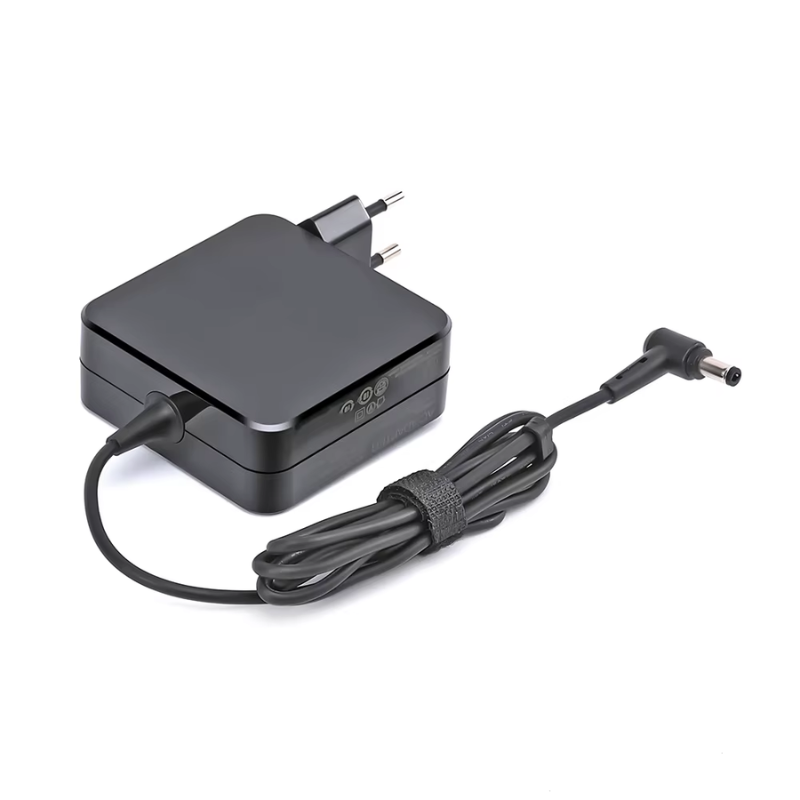
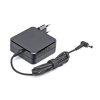
Power Adapter Charger for Asus K556UA-WH71
KSh 3,109.00
Technical Specifications
| Metric | Verified Hardware Target |
| Exact Sub-Model Support | Asus K556UA-WH71 |
| Physical Connector Profile | 4.0mm × 1.35mm Ultra-Slim Circular Tip |
| Output Voltage Standard | 19 Volts (DC) |
| Amperage Handling Threshold | 2.37 Amperes (45W) or 3.42 Amperes (65W Upgrade) |
| Total Wattage Rating | 45 Watts baseline factory standard (65 Watts version is highly recommended to handle the Core i7 hardware configuration with lower operating temperatures under load) |
| Input Grid Compatibility | AC 100V – 240V, 50Hz – 60Hz Universal Range |
| Form Factor Configuration | Space-saving wall-wart plug design or compact inline mini-brick |
Power Adapter Charger for Asus K556UA-WH71
The Asus K556UA-WH71 is a high-tier configuration within the K556 computing family, packing a 15.6-inch Full HD display powered by an Intel Core i7-6500U processor and integrated Intel HD Graphics 520. Because this specific sub-model carries a higher-frequency Core i7 processing core, it places a highly dynamic load on the system’s power delivery lines during intensive compilation, rendering, or heavy multitasking. Maintaining a completely flat, low-ripple direct current (DC) line is vital to protect the logic board’s voltage regulator modules (VRMs).
Using an unverified third-party charger with inadequate line filtration presents a severe hardware hazard. Voltage variance can cause erratic behavior, such as a lagging or frozen trackpad cursor, slow battery recharge tracking, or permanent damage to the delicate internal power rails.
Asus K556UA-WH71 Product Overview
This replacement power adapter is specifically manufactured to match the strict electrical profile and structural configuration of the Asus K556UA-WH71 notebook. Moving away from the heavy legacy 5.5mm barrel plugs found on older K-series models, the Asus K556UA-WH71 motherboard layout relies exclusively on a modern, miniaturized 4.0mm outside diameter by 1.35mm inside diameter (4.0mm × 1.35mm) slim pin connector. This lightweight cylindrical tip slides flush into the laptop’s charging socket, significantly reducing the mechanical stress exerted on the internal DC jack joints during everyday handling. Wound with high-density copper cabling, it guarantees exceptional power conversion efficiency with very low heat output.
Asus K556UA-WH71 Key Features
-
Miniaturized 4.0mm × 1.35mm Slim Pin: Tailored specifically for modern Asus charging ports, guaranteeing a firm, flush fit that eliminates loose-contact heating or sparking.
-
Stable 19V Line Delivery: Supplies a constant, smooth 19V direct current to prevent processor throttling or system lag when running under maximum multitasking workloads.
-
Multi-Tier Protection Circuitry: Advanced internal control chips provide integrated over-voltage protection (OVP), over-current protection (OCP), and short-circuit protection (SCP) to cushion your hardware against unexpected municipal grid spikes.
-
Global Grid Flexibility: Universally converts incoming alternating currents (AC) from 100V up to 240V, allowing safe operation anywhere in the world.
Asus K556UA-WH71 Technical Specifications
| Metric | Verified Hardware Target |
| Exact Sub-Model Support | Asus K556UA-WH71 |
| Physical Connector Profile | 4.0mm × 1.35mm Ultra-Slim Circular Tip |
| Output Voltage Standard | 19 Volts (DC) |
| Amperage Handling Threshold | 2.37 Amperes (45W) or 3.42 Amperes (65W Upgrade) |
| Total Wattage Rating | 45 Watts baseline factory standard (65 Watts version is highly recommended to handle the Core i7 hardware configuration with lower operating temperatures under load) |
| Input Grid Compatibility | AC 100V – 240V, 50Hz – 60Hz Universal Range |
| Form Factor Configuration | Space-saving wall-wart plug design or compact inline mini-brick |
Asus K556UA-WH71 Price Breakdown
Selecting an insulated, certified power accessory shields your laptop’s internal logic boards from electrical noise while maximizing the lifespan of your lithium-polymer battery bank:
| Power Supply Configuration | Estimated Retail Price Range (KES) | Recommended Application |
| Standard 45W AC Adapter | KES 2,500 – KES 3,800 | Standard factory-spec match. Easily covers everyday office workloads, spreadsheet tracking, online learning, and high-definition video streaming. |
| Upgraded 65W AC Adapter | KES 3,800 – KES 4,800 | Highly Recommended performance configuration. Because the Core i7 system safely regulates incoming current, a 65W brick delivers faster battery recovery cycles and operates with a cooler external surface temperature under heavy performance loads. |
Note: Final retail prices inside tech retail corridors in Nairobi, Mombasa, Kisumu, Nakuru, and Eldoret are subject to customs clearance logistics and the duration of the localized replacement warranty (typically spanning 6 to 12 months).
Asus K556UA-WH71 Pros & Cons
Pros:
-
Lightweight and Compact: The tiny 4.0mm x 1.35mm charging profile means the adapter brick is highly portable and stores easily into minimal backpack spaces.
-
Flush Port Seating: The specialized pin profile slots completely into the laptop frame, lessening the danger of bending the jack if the notebook is tipped on its side.
-
High Operational Efficiency: Low internal resistance in the high-grade copper wire translates into excellent energy utilization and less wasted heat.
Cons:
-
Incompatible with Older K-Series: Will not fit legacy Asus models (like the K555 or K550 series) that rely on the much thicker 5.5mm x 2.5mm barrel plug.
-
Delicate Pin Core: Because the 4.0mm tip is significantly thinner than older generation plugs, it requires careful handling to avoid accidental bending from extreme cord yanks.
Asus K556UA-WH71 Verdict
To restore stable power to your notebook, you must choose an adapter that provides a 19V output configuration paired with the specific 4.0mm × 1.35mm slim pin connector. While the baseline 45W unit matches standard factory settings, stepping up to the 65W power variant grants a much higher thermal threshold, ensuring your charger stays remarkably cool when the Core i7 processor is fully pushed during prolonged computing sessions.
Reviews
There are no reviews yet.