
No products in the cart.
Roll over image to zoom in
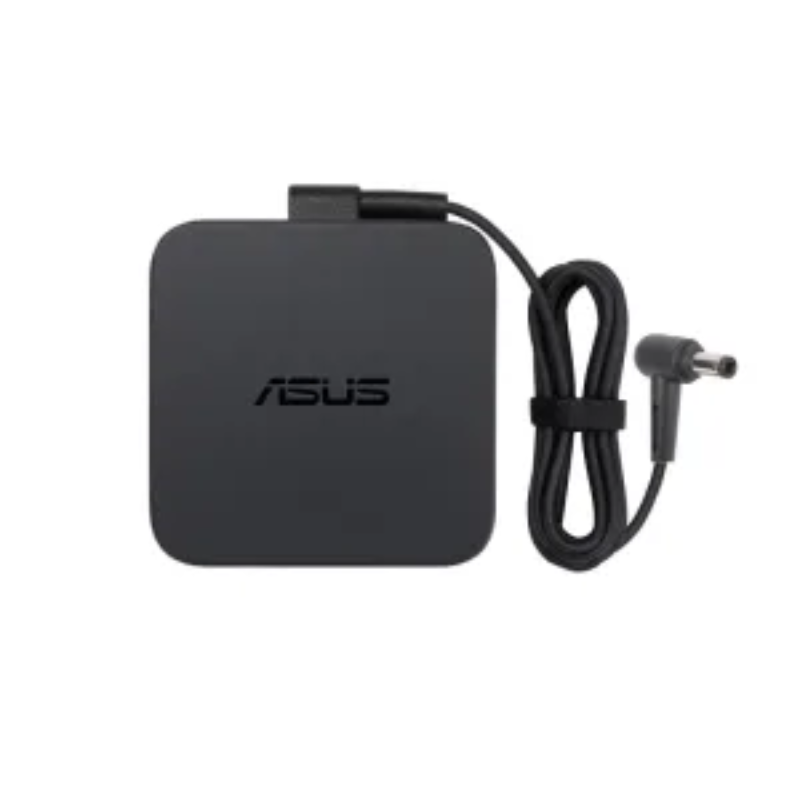
Power Adapter Charger for Asus R704A
KSh 3,109.00
Technical Specifications
| Metric | Verified Hardware Target |
| Exact Model Support | Asus R704A (Includes sub-variants like R704A-TY series) |
| Physical Connector Profile | 5.5mm × 2.5mm Standard Circular Barrel Plug (No interior center pin) |
| Output Voltage Standard | 19 Volts (DC) |
| Amperage Handling Threshold | 3.42 Amperes (Standard 65W) or 4.74 Amperes (Performance 90W alternative) |
| Total Wattage Rating | 65 Watts / 90 Watts (Note: While the base integrated-graphics R704A configuration natively targets a 65W threshold, upgrading to a 90W adapter featuring the exact same 5.5mm x 2.5mm tip size is entirely safe and highly recommended. The laptop’s power management will only draw the required current, while the 90W brick runs noticeably cooler due to its extra operational overhead). |
| Input Grid Compatibility | AC 100V – 240V, 50Hz – 60Hz Universal Range |
| Form Factor Configuration | Solid inline external adapter block matched with a detachable 3-pin AC wall cord |
Power Adapter Charger for Asus R704A
The Asus R704A is a large-format 17.3-inch desktop replacement notebook built around reliable Intel Core processors and integrated Intel HD Graphics. Because this configuration pairs a massive, high-definition display panel with a highly energy-efficient processor architecture, its baseline power demands are flat and stable during office work, though they scale up during intensive multitasking. To protect the spacious motherboard and ensure stable voltage delivery to the internal display inverter circuits, the device requires a tightly regulated direct current (DC) line.
Avoid budget aftermarket chargers or multi-voltage generic power blocks. Cheap power bricks often lack built-in filtering capacitors and proper insulation, allowing raw high-frequency electrical line ripples from the grid to pass directly onto the mainboard. This electrical instability commonly leads to erratic trackpad drifting, ghost clicks, localized heating around the power jack, and accelerated degradation of the internal battery cells.
Asus R704A Product Overview
This verified replacement power adapter is engineered to precisely match the hardware voltage tolerances and physical port configurations of the Asus R704A chassis. The internal charging socket on this model uses the legacy 5.5mm outside diameter by 2.5mm inside diameter (5.5mm × 2.5mm) large round barrel plug. This heavy-duty plug profile delivers substantial physical durability, anchoring securely into the laptop’s lateral input port to prevent loose-connection issues that cause spark damage or overheating.
Asus R704A Key Features
-
Heavy-Duty 5.5mm × 2.5mm Barrel Pin: Designed thick to handle regular repositioning and physical cable strain without loosening over time.
-
Stable 19V DC Output: Delivers steady, flicker-free power to ensure smooth CPU clock management and uncompromised performance under heavy workloads.
-
Comprehensive Safe-Charging Array: Integrated smart microchips dynamically protect your laptop against over-voltage (OVP), over-current (OCP), and short circuits (SCP).
-
High-Grade Fire-Retardant Shell: Constructed from heat-resistant composite compounds that facilitate uniform cooling during long charging sessions.
Asus R704A Technical Specifications
| Metric | Verified Hardware Target |
| Exact Model Support | Asus R704A (Includes sub-variants like R704A-TY series) |
| Physical Connector Profile | 5.5mm × 2.5mm Standard Circular Barrel Plug (No interior center pin) |
| Output Voltage Standard | 19 Volts (DC) |
| Amperage Handling Threshold | 3.42 Amperes (Standard 65W) or 4.74 Amperes (Performance 90W alternative) |
| Total Wattage Rating | 65 Watts / 90 Watts (Note: While the base integrated-graphics R704A configuration natively targets a 65W threshold, upgrading to a 90W adapter featuring the exact same 5.5mm x 2.5mm tip size is entirely safe and highly recommended. The laptop’s power management will only draw the required current, while the 90W brick runs noticeably cooler due to its extra operational overhead). |
| Input Grid Compatibility | AC 100V – 240V, 50Hz – 60Hz Universal Range |
| Form Factor Configuration | Solid inline external adapter block matched with a detachable 3-pin AC wall cord |
Asus R704A Price Breakdown
Investing in a well-insulated, professionally assembled power block protects your large-format machine from grid fluctuations:
| Power Supply Configuration | Estimated Retail Price Range (KES) | Recommended Application |
| Standard 65W AC Adapter (5.5mm Tip) | KES 2,500 – KES 3,500 | The official hardware standard. Safely handles daily typing, spreadsheet management, student tasks, and continuous media streaming. |
| Heavy-Duty 90W AC Adapter (5.5mm Tip) | KES 3,000 – KES 4,500 | The premium cooling alternative. Recommended for users who keep the laptop plugged in for extended 24/7 business hours, providing higher thermal overhead. |
Asus R704A Pros & Cons
Pros:
-
Excellent Structural Longevity: The 5.5mm tip resists structural twisting and accidental bends much more effectively than modern, ultra-slim micro-pins.
-
Widespread Local Availability: Because this 19V 5.5mm × 2.5mm blueprint is shared across multiple generations of older Asus, Toshiba, and Lenovo systems, finding local replacements is incredibly straightforward.
-
Optimal Thermal Overhead: Operating a 90W block on a 65W laptop reduces the operational load on the adapter, extending the lifespan of the charger itself.
Cons:
-
Bulky Footprint: The combined weight of the heavy-duty transformer block and thick 3-pin AC cable is noticeably bulkier to pack away than modern USB-C power bricks.
-
Zero Compatibility with Slim Devices: This connector plug is too large to physically slide into modern, slim Asus lines like the ZenBook or VivoBook series requiring 4.0mm or 3.0mm tips.
Asus R704A Verdict
To guarantee steady power flow and preserve the runtime performance of your 17.3-inch workspace, pairing the device with a high-grade 19V replacement adapter utilizing a 5.5mm × 2.5mm round barrel plug is standard protocol. Verifying your device’s exact power label ensures clean current delivery, preventing erratic trackpad glitching, sluggish battery tracking, or system performance bottlenecks during daily workloads.

Reviews
There are no reviews yet.