
No products in the cart.
Roll over image to zoom in
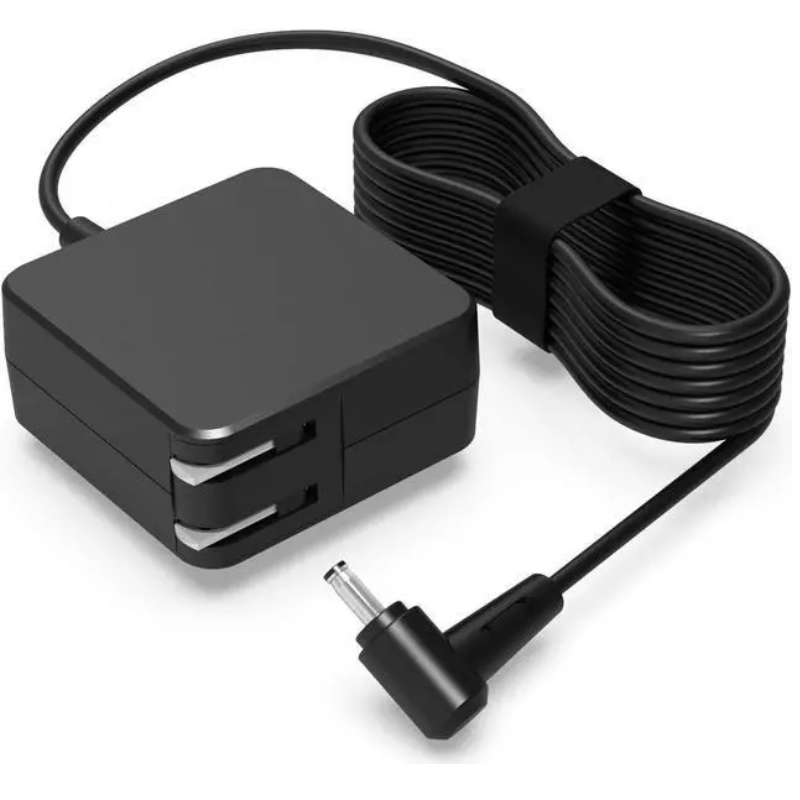
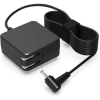
Power Adapter Charger for Asus Q552UB
KSh 2,980.00
Technical Specifications
| Metric | Verified Hardware Target |
| Exact Model Support | Asus Q552UB / Q552UB-BHI7T12 |
| Physical Connector Profile | 5.5mm × 2.5mm Standard Straight Circular Plug (No inner center needle) |
| Output Voltage Standard | 19 Volts (DC) |
| Amperage Handling Threshold | 3.42 Amperes |
| Total Wattage Rating | 65 Watts (Note: Fully backward compatible with lower 19V 2.37A 45W setups, but running 45W under heavy workloads will cause extreme brick overheating. Stick to the 65W standard). |
| Input Grid Compatibility | AC 100V – 240V, 50Hz – 60Hz Universal Range |
| Form Factor Configuration | Inline external desktop transformer block matched with a detachable 3-prong AC power cord |
Power Adapter Charger for Asus Q552UB
The Asus Q552UB (often localized under retail variants like the Q552UB-BHI7T12) is a high-end 15.6-inch flip-and-fold 2-in-1 touchscreen laptop. It runs on a 6th Generation Intel Core i7 processor accompanied by discrete NVIDIA GeForce 940M graphics. Because this specific hardware layout simultaneously powers a vibrant, digitized multi-touch panel and a dedicated graphics processor, it places notable demands on its power supply. Ensuring an uninterrupted, well-filtered direct current (DC) line is absolutely vital to protect your motherboard components and sustain long-term battery performance.
Using low-tier, poorly insulated replacement power bricks exposes your machine to immediate hazards. Inadequate internal filtering allows electrical ripple noise onto the motherboard. This often triggers erratic “ghost touches” or freezing on your touchscreen, creates tracking stutters on your touchpad cursor, and causes the internal battery cells to run dangerously warm.
Asus Q552UB Product Overview
This precise replacement power block is tailored to meet the strict current consumption boundaries and mechanical jack mechanics of the Asus Q552UB chassis. While modern thin-and-light laptops have moved toward highly fragile micro-pins, the Asus Q552UB motherboard depends on the heavy-duty 5.5mm outside diameter by 2.5mm inside diameter (5.5mm × 2.5mm) straight circular barrel connector. This broad barrel format seats deeply and tightly inside the notebook’s side power jack, providing strong mechanical durability against daily pull strain and minimizing loose connections that cause localized port overheating.
Asus Q552UB Key Features
-
Industrial 5.5mm × 2.5mm Barrel Profile: Fits tightly into the native Q552UB power port to prevent physical wobbling, sparking, or sudden charging cutouts.
-
Continuous 19V DC Output: Delivers a reliable, unthrottled 19V rail, allowing the Core i7 CPU and NVIDIA graphics card to handle multi-layered tasks smoothly.
-
Multi-Layer Safety Shielding: Outfitted with dedicated internal logic guarding against over-voltage (OVP), over-current (OCP), and short-circuit (SCP) spikes caused by public grid fluctuations.
-
Universal AC Input Support: Responsively handles alternative input alternating current ranges from 100V up to 240V for easy travel compatibility.
Asus Q552UB Technical Specifications
| Metric | Verified Hardware Target |
| Exact Model Support | Asus Q552UB / Q552UB-BHI7T12 |
| Physical Connector Profile | 5.5mm × 2.5mm Standard Straight Circular Plug (No inner center needle) |
| Output Voltage Standard | 19 Volts (DC) |
| Amperage Handling Threshold | 3.42 Amperes |
| Total Wattage Rating | 65 Watts (Note: Fully backward compatible with lower 19V 2.37A 45W setups, but running 45W under heavy workloads will cause extreme brick overheating. Stick to the 65W standard). |
| Input Grid Compatibility | AC 100V – 240V, 50Hz – 60Hz Universal Range |
| Form Factor Configuration | Inline external desktop transformer block matched with a detachable 3-prong AC power cord |
Asus Q552UB Price Breakdown
Investing in a well-insulated, high-quality 65W power brick provides clean voltage delivery and safeguards your laptop’s core logic board components:
| Power Supply Configuration | Estimated Retail Price Range (KES) | Recommended Application |
| Premium / Original 65W AC Adapter | KES 3,000 – KES 4,000 | The official hardware standard. Reliably delivers enough power to sustain heavy computing, continuous display brightness, and fast battery charging cycles without getting overly hot. |
Asus Q552UB Pros & Cons
Pros:
-
Excellent Physical Durability: The chunky 5.5mm x 2.5mm barrel design withstands daily travel friction much better than brittle modern thin-pins, protecting your motherboard’s internal DC port from breaking.
-
High Part Interchangeability: Because this exact specification is highly standardized across older laptop architectures, sourcing an urgent replacement unit or a spare for the office is exceptionally quick.
-
Excellent Efficiency Curve: Runs with low thermal conversion loss, meaning the power block maintains a safe, lukewarm surface temperature during long usage sessions.
Cons:
-
Incompatible with Micro-Pins: This adapter will not fit or power modern ultra-slim Asus ZenBook, VivoBook, or Chromebook lines utilizing 4.0mm or 3.0mm tips.
-
No USB Type-C Delivery: It cannot be modified or split to charge modern smartphones, tablets, or Type-C computing platforms.
Asus Q552UB Verdict
To ensure safe, reliable operation on your 2-in-1 touchscreen convertible, configuring your setup with an adapter pushing 19V through a 5.5mm × 2.5mm circular barrel plug is critical. Picking up a premium 65W power supply ensures that your hardware receives a clean, steady flow of electricity—preventing processing speed drops, delayed battery charging curves, or touch-sensitivity interference during high-demand workloads.

Reviews
There are no reviews yet.